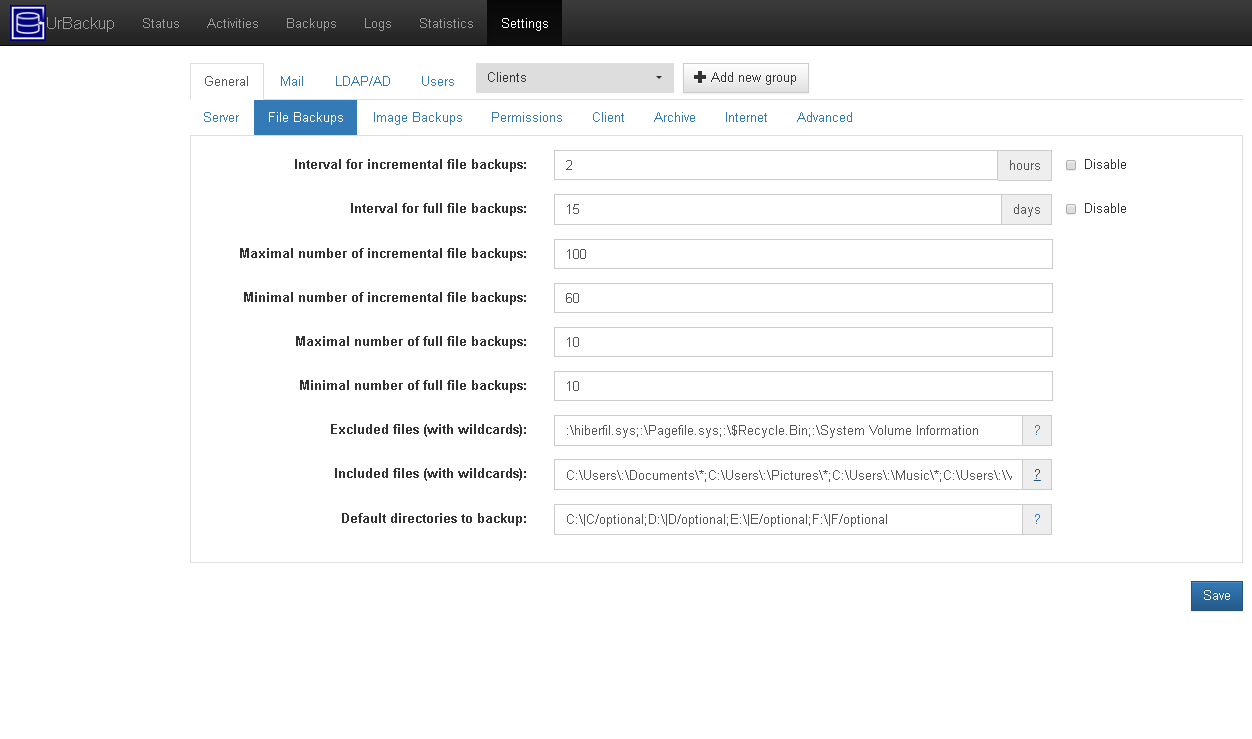
This tells the system to backup the drives C:, D:, E:, and F: if they exist.
If they don’t exist the system just carries on.
Had you put C:;D:;\E:;F:\ it will try to back up C:, D:, E:, and F: and fail if they don’t exist.
There are some files you probably don’t care about backing up, for example the system volume information, recycle bin, the page file and the hibernation file, so you should add these to the excluded files list, like so:
:\hiberfil.sys;:\Pagefile.sys;:$Recycle.Bin;:\System Volume Information
If you knew you had drives other than C, D, E, and F you could add these to the list as well as either optional or required drives.
I think that the fact that you’ve listed items in the “Included files” section will prevent it from copying files from places not listed.
My preference is to leave “Included files” blank and control what isn’t to be backed up through “Excluded files” so that it captures all the contents of the drive.
I think you may have mis-formatted what you did put into the “Included files” section as some of your filepaths have multiple colons in, i.e. “C:\Users:\Documents*” isn’t a valid file path.
from the manual
Additionally to the standard wildcard("*") which matches every character you can use “:” which matches every character except the path separator (/ or ). If you backup e.g. the C:\Users path and want to backup all document directories you can use the pattern
My apologies, I had assumed that as : was part of the standard file path on Windows that it would maintain that purpose.
Ignoring that part of my answer, I believe that my point regarding the use of Include preventing other locations being backed up is valid as stated here (from the FAQ):
If you do not define an include pattern all files in the backups paths except the excluded ones are backed up. As soon as you define an include pattern only files which match this pattern are backed up.