I’m still using 1.4.x
I haven’t upgraded because this has worked so well I didn’t want to jinx it.
However, my statistics show me using about 1TB more space than I see physically being taken up on the storage hard drive. I’m worried something isn’t being backed up properly. Is there a way to re-calculate the space being used?
UrBackup does some special things to heavily reduce the space requirements. It can turn a terrabyte drive into a four terrabyte backup location (~It varies); it’s just the way the compression and how the program works.
If you take a look at your disk properties then that will tell you what the disk has available; if you look at the properties of your entire directory then it will probably tell you a number much larger - I believe this has something to do with the hard-links/backup process.
What server OS are you using? If it does dedup of your backup path that can cause the behavior you are seeing.
Ok, that makes sense. I’m using Windows Server 2012 and have a 2TB drive but the statistics show me using almost 3TB
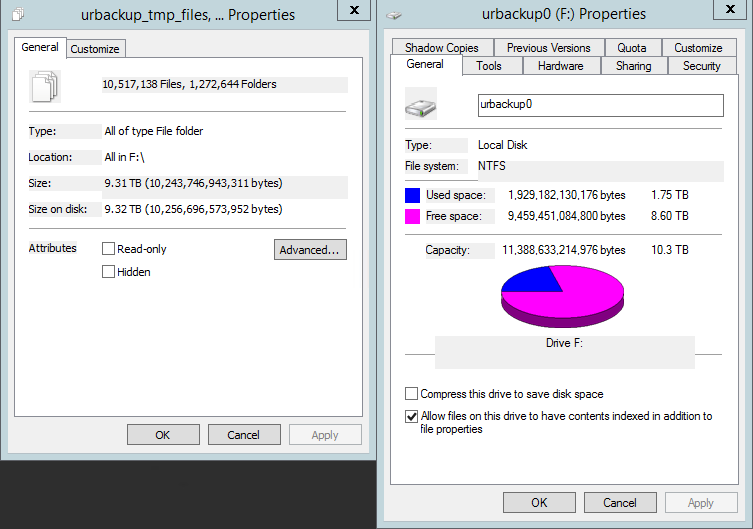
For reference:
Left: Size that the files say they take up.
Right: Size that the drive says is being used.
1 Like