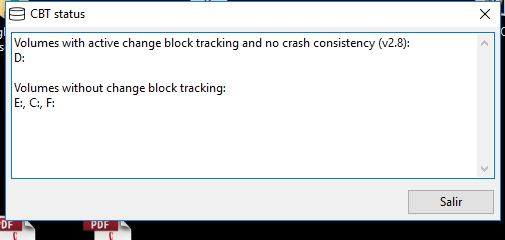
I recently bought the CBT Client and after install it into a Windows 10 Pro machine I have been some problems.
I have latest server version (2.2.7) and latest CBT (2.2.5-beta).
Server is running in Windows Server 2016.
Server and client are with all default settings.
I want to use CBT Client to speed up file backups, specially for big files (like outlook pst mailbox).
After install client and reboot system, I have maked the first complete file backkup. After this, some errors appears in logs and CBT is not enabled for all my disks. And for the disk that is enabled is not working.
For every incremental backup I receive same errors.
Any help on this? It is a little frustrating.
I have uninstalled the driver and reinstalled it and now it is active for all my units but still having the shadow copy error
I have enabled debug in client. The log displays other error just before the shadow copy error:
2018-02-23 17:58:47: ERROR: Recvfrom error in CUDPThread::UdpStep
2018-02-23 17:58:47: ERROR: Last error: 10058
2018-02-23 17:59:08: ERROR: Getting changed block data from shadow copy \?\GLOBALROOT\Device\HarddiskVolumeShadowCopy11 failed: Hay más datos disponibles. (code: 234)
I have tested the new version and it works absolutely fine. @uroni, one of my big doubts to use CBT is if is necessary to change server settings to enable 'Block difference - hashed" in complete and/or incremental backups to really speed up data transfers? Or it will works in the same way?