Hi, I love Urbackup but it is too time consuming for me to troubleshoot always. Since days I am trying to solve the issue, I would prefer if some pro of you guys can help solve my problem, of course PAID$:
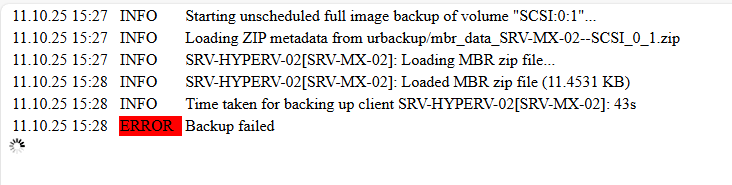
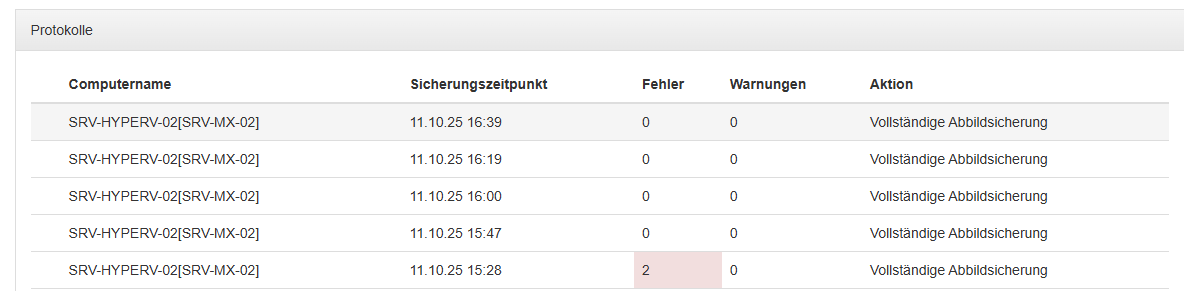
Backing up HyperVM with HyperV Client: Somehow it seems to work but only after multiple errors:
I already tried on the HYPERV Host itself, the checkpoint is a production checkpoint and is working if I trigger it via powershell.
Also deleted any existing full backups, urbackupsrv remove-unknown, same behavior.
So in short, the backup is working but only after multiple errors, I would like to get rid of the errors.
Maybe someone is willing to help with me take a look at the logfiles and stuff via anydesk?
To further analyse the problem a client debug log would be useful. The client log file is per default located at C:\Program Files\UrBackup\debug.log on Windows. Run C:\Program Files\UrBackup\enable_debug_logging.bat as admin to enable debug logging. Once debug logging is enabled reproduce the problem.
Attach the log files to your new post or send them to bugreports@urbackup.org because they may contain data which should not be public.
Hi Uroni, Error is still existing, Urbackup is crashing the hole Host. I have to manually hard reboot the host in person.
Right now the VM just crashed when Urbackup started to create the checkpoint, happy the host is still runinng this time. Do I have to use “standard” checkpoints instead maybe? When i manuelly trigger a checkpoint in the hyperv manager it works all fine
I already sent you a lot of logfiles, can you please have a look and help me?
Yes, it is really an annoying problem, at least the last days my host is running stable, but I can´t trust it. My Urbackup Server is running on a Linux VM Machine, maybe I should install it on a Microsoft Server. I didn´t try yet. Uroni sent me a link to a Microsoft Version with earlier error reporting. I didn´t try it yet, maybe you are lucky with it, give it a shot (sent by PM).
One scenario matching the logs is that it is able to snapshot, but then fails to access the .vhdx/.avhdx file to read the data. In that case it snapshots again in rapid succession maybe causing the hang.
I’ve sent @urbackupisgreat a version with more detailed logging and that should not snapshot in rapid succession.
If it is e.g. a permission problem that would need to be fixed differently, e.g. by adjusting permissions such that the UrBackupClientBackend service can access the snapshot files.
Second Partition 0:1 Error: I saw on the hyperv that the Snapshot had just finished merging, maybe it needs a little more time before it tries to create the second snapshot of 0:1?
In order:
0:1 failed
0:2 success - Image backup is being backed up in a snapshot group together with volumes SCSI:0:0, SCSI:0:1
0:1 success - Image backup is being backed up in a snapshot group together with volumes SCSI:0:0, SCSI:0:2
0:2 success - Image backup is being backed up in a snapshot group together with volumes SCSI:0:0, SCSI:0:1
0:0 success - Image backup is being backed up in a snapshot group together with volumes SCSI:0:2, SCSI:0:1
It still want´s to backup 0:1 again, but now it is hanging, no snapshot is created on the hyperv, the existing snapshot has been merged and deleted successfully: