we have a problem to take a backup with the commercial Urbackup Hyper-V Client from a VM with a large image (4,9TB). The backup fails with the error “Bitmap too large”.
How can we fix this?
Server Log:
2025-11-12 10:18:05: ERROR: Bitmap too large
2025-11-12 10:18:05: ERROR: Backup failed
2025-11-12 10:18:06: WARNING: Exponential backoff: Waiting at least 3 days 13h 20m before next image backup
Client Log:
Starting unscheduled full image backup of volume “SCSI:0:0”…
Loading ZIP metadata from urbackup/mbr_data_xxx–SCSI_0_0.zip
Hyper-V2025-1[xxx]: Loading MBR zip file…
Hyper-V2025-1[xxx]: Loaded MBR zip file (14.1689 KB)
Bitmap too large
Transferred 1.65039 KB - Average speed: 2.128 KBit/s
Time taken for backing up client Hyper-V2025-1[xxx]: 49s
Backup failed
To further analyse the problem a client debug log would be useful. The client log file is per default located at C:\Program Files\UrBackup\debug.log on Windows. Run C:\Program Files\UrBackup\enable_debug_logging.bat as admin to enable debug logging. Once debug logging is enabled reproduce the problem.
Attach the log files to your new post or send them to bugreports@urbackup.org because they may contain data which should not be public.
Hello uroni, thanks for your fast response!
Attached you will find the Logfile. Strange thing, after the failed backup from the SCSI:0:0 it begins a backup of IDE:0:1. This is the system partition which i have disabled for debug purpose. The config look like this:
2025-11-13 08:47:59: Start FILESRV thread
2025-11-13 08:47:59: FileSRV received 116
2025-11-13 08:47:59: FileSrv: Received data…
2025-11-13 08:47:59: FileSrv: Received a Packet.
2025-11-13 08:47:59: FileSrv: Sending file (normal) urbackup/mbr_data_xxxxxxx–SCSI_0_0.zip.err metadata_id=0
2025-11-13 08:47:59: FileSrv: Mapped name: C:\Program Files\UrBackup\urbackup\data\mbr_data_xxxxxxx–SCSI_0_0.zip.err
2025-11-13 08:47:59: FileSrv: Could not open file \?\C:\Program Files\UrBackup\urbackup\data\mbr_data_xxxxxxx–SCSI_0_0.zip.err. Das System kann die angegebene Datei nicht finden. (code: 2)
2025-11-13 08:47:59: FileSrv: Received a Packet.
2025-11-13 08:47:59: Received flush.
2025-11-13 08:47:59: FileSRV received 91
2025-11-13 08:47:59: FileSrv: Received data…
2025-11-13 08:47:59: FileSrv: Received a Packet.
2025-11-13 08:47:59: FileSrv: Sending file (normal) urbackup/mbr_data_xxxxxxx–SCSI_0_0.zip metadata_id=0
2025-11-13 08:47:59: FileSrv: Mapped name: C:\Program Files\UrBackup\urbackup\data\mbr_data_xxxxxxx–SCSI_0_0.zip
2025-11-13 08:47:59: FileSrv: Could not open file \?\C:\Program Files\UrBackup\urbackup\data\mbr_data_xxxxxxx–SCSI_0_0.zip. Das System kann die angegebene Datei nicht finden. (code: 2)
2025-11-13 08:47:59: FileSRV received 21
2025-11-13 08:47:59: FileSrv: Received data…
2025-11-13 08:47:59: FileSrv: Received a Packet.
2025-11-13 08:47:59: Received flush.
2025-11-13 08:47:59: Script “C:\Program Files\UrBackup\preimagebackup.bat” returned with success
2025-11-13 08:47:59: Creating shadowcopy of “hyperv://xxxxxxx/SCSI:0:0”…
2025-11-13 08:47:59: Converting snapshot of xxxxxxx to reference point…
2025-11-13 08:48:00: ERROR: Error converting hyper-v snapshot of xxxxxxx to reference point. Output: No snapshot to convert to reference point found
2025-11-13 08:48:00: Converting snapshot of xxxxxxx to reference point…
2025-11-13 08:48:00: FileSRV received 91
2025-11-13 08:48:00: FileSrv: Received data…
2025-11-13 08:48:00: FileSrv: Received a Packet.
2025-11-13 08:48:00: FileSrv: Sending file (normal) urbackup/mbr_data_xxxxxxx–SCSI_0_0.zip metadata_id=0
2025-11-13 08:48:00: FileSrv: Mapped name: C:\Program Files\UrBackup\urbackup\data\mbr_data_xxxxxxx–SCSI_0_0.zip
2025-11-13 08:48:00: FileSrv: Could not open file \?\C:\Program Files\UrBackup\urbackup\data\mbr_data_xxxxxxx–SCSI_0_0.zip. Das System kann die angegebene Datei nicht finden. (code: 2)
2025-11-13 08:48:00: FileSRV received 21
2025-11-13 08:48:00: FileSrv: Received data…
2025-11-13 08:48:00: FileSrv: Received a Packet.
2025-11-13 08:48:00: Received flush.
2025-11-13 08:48:00: ERROR: Error converting hyper-v snapshot of xxxxxxx to reference point. Output: No snapshot to convert to reference point found
2025-11-13 08:48:01: FileSRV received 91
2025-11-13 08:48:01: FileSrv: Received data…
2025-11-13 08:48:01: FileSrv: Received a Packet.
2025-11-13 08:48:01: FileSrv: Sending file (normal) urbackup/mbr_data_xxxxxxx–SCSI_0_0.zip metadata_id=0
2025-11-13 08:48:01: FileSrv: Mapped name: C:\Program Files\UrBackup\urbackup\data\mbr_data_xxxxxxx–SCSI_0_0.zip
2025-11-13 08:48:01: FileSrv: Could not open file \?\C:\Program Files\UrBackup\urbackup\data\mbr_data_xxxxxxx–SCSI_0_0.zip. Das System kann die angegebene Datei nicht finden. (code: 2)
2025-11-13 08:48:01: FileSRV received 21
2025-11-13 08:48:01: FileSrv: Received data…
2025-11-13 08:48:01: FileSrv: Received a Packet.
2025-11-13 08:48:01: Received flush.
2025-11-13 08:48:01: VM list: x
2025-11-13 08:48:02: FileSRV received 91
2025-11-13 08:48:02: FileSrv: Received data…
2025-11-13 08:48:02: FileSrv: Received a Packet.
2025-11-13 08:48:02: FileSrv: Sending file (normal) urbackup/mbr_data_xxxxxxx–SCSI_0_0.zip metadata_id=0
2025-11-13 08:48:02: FileSrv: Mapped name: C:\Program Files\UrBackup\urbackup\data\mbr_data_xxxxxxx–SCSI_0_0.zip
2025-11-13 08:48:02: FileSrv: Could not open file \?\C:\Program Files\UrBackup\urbackup\data\mbr_data_xxxxxxx–SCSI_0_0.zip. Das System kann die angegebene Datei nicht finden. (code: 2)
2025-11-13 08:48:02: FileSRV received 21
2025-11-13 08:48:02: FileSrv: Received data…
2025-11-13 08:48:02: FileSrv: Received a Packet.
2025-11-13 08:48:02: Received flush.
2025-11-13 08:48:02: FileSRV received 116
2025-11-13 08:48:02: FileSrv: Received data…
2025-11-13 08:48:02: FileSrv: Received a Packet.
2025-11-13 08:48:02: FileSrv: Sending file (normal) urbackup/mbr_data_xxxxxxx–SCSI_0_0.zip.err metadata_id=0
2025-11-13 08:48:02: FileSrv: Mapped name: C:\Program Files\UrBackup\urbackup\data\mbr_data_xxxxxxx–SCSI_0_0.zip.err
2025-11-13 08:48:02: FileSrv: Could not open file \?\C:\Program Files\UrBackup\urbackup\data\mbr_data_xxxxxxx–SCSI_0_0.zip.err. Das System kann die angegebene Datei nicht finden. (code: 2)
2025-11-13 08:48:02: FileSrv: Received a Packet.
2025-11-13 08:48:02: Received flush.
2025-11-13 08:48:03: done.
2025-11-13 08:48:04: ClientService cmd: PONG
2025-11-13 08:48:06: Zeroing image hash data of volume hyperv://xxxxxxx/SCSI:0:0…
2025-11-13 08:48:09: ClientService cmd: #IVSxpebQ5owgFBZVvTPkp#2PING RUNNING pc_done=0&status_id=36&speed_bpms=0&total_bytes=-1&done_bytes=0&paused_fb=1#token=68s4bTtjK580oPR4VaVd5
2025-11-13 08:48:17: Zeroed 35.4653 GB
2025-11-13 08:48:17: Hyper-V save_id 1499
2025-11-13 08:48:19: ClientService cmd: #IVSxpebQ5owgFBZVvTPkp#2PING RUNNING pc_done=0&status_id=36&speed_bpms=0&total_bytes=-1&done_bytes=0&paused_fb=1#token=68s4bTtjK580oPR4VaVd5
2025-11-13 08:48:20: Zeroing image hash data of volume hyperv://xxxxxxx/IDE:0:1…
2025-11-13 08:48:20: Zeroed 1.93164 GB
2025-11-13 08:48:20: Hyper-V save_id 1498
2025-11-13 08:48:22: FileSRV received 91
2025-11-13 08:48:22: FileSrv: Received data…
2025-11-13 08:48:22: FileSrv: Received a Packet.
2025-11-13 08:48:22: FileSrv: Sending file (normal) urbackup/mbr_data_xxxxxxx–SCSI_0_0.zip metadata_id=0
2025-11-13 08:48:22: FileSrv: Mapped name: C:\Program Files\UrBackup\urbackup\data\mbr_data_xxxxxxx–SCSI_0_0.zip
2025-11-13 08:48:22: FileSrv: Reading last file part
2025-11-13 08:48:22: FileSrv: Info: File End
2025-11-13 08:48:22: FileSrv: Closed file.
2025-11-13 08:48:22: FileSRV received 21
2025-11-13 08:48:22: FileSrv: Received data…
2025-11-13 08:48:22: FileSrv: Received a Packet.
2025-11-13 08:48:22: Received flush.
2025-11-13 08:48:22: FileSRV received 99
2025-11-13 08:48:22: FileSrv: Received data…
2025-11-13 08:48:22: FileSrv: Received a Packet.
2025-11-13 08:48:22: FileSrv: Sending file (normal) urbackup/mbr_data_xxxxxxx–SCSI_0_0.zip.save_id metadata_id=0
2025-11-13 08:48:22: FileSrv: Mapped name: C:\Program Files\UrBackup\urbackup\data\mbr_data_xxxxxxx–SCSI_0_0.zip.save_id
2025-11-13 08:48:22: FileSrv: Reading last file part
2025-11-13 08:48:22: FileSrv: Info: File End
2025-11-13 08:48:22: FileSrv: Closed file.
2025-11-13 08:48:22: FileSRV received 21
2025-11-13 08:48:22: FileSrv: Received data…
2025-11-13 08:48:22: FileSrv: Received a Packet.
2025-11-13 08:48:22: Received flush.
2025-11-13 08:48:22: FileSrv: Recv Error in RecvMessage
2025-11-13 08:48:22: FileSrv: Deleting Memory…
2025-11-13 08:48:22: FileSrv: done.
2025-11-13 08:48:22: ClientService cmd: #IVSxpebQ5owgFBZVvTPkp#FULL IMAGE letter=SCSI:0:0&token=68s4bTtjK580oPR4VaVd5&checksum=1&bitmap=1&clientsubname=xxxxxxx&status_id=36&running_jobs=0&shadowid=1499&zero_skipped=1
2025-11-13 08:48:22: Drive size not aligned to 4096 bytes. Using 512 bytes.
2025-11-13 08:48:22: ClientService cmd: STATUS#pw=iUIg8a9nAIlrxjvjp5dvFtvsM1PI9p
2025-11-13 08:48:23: ERROR: Setting FSCTL_ALLOW_EXTENDED_DASD_IO failed -2. Err: 50
2025-11-13 08:48:23: ClientService cmd: STATUS#pw=iUIg8a9nAIlrxjvjp5dvFtvsM1PI9p
2025-11-13 08:48:28: ERROR: Pipe broken while sending bitmap
2025-11-13 08:48:28: rc=0 hasError=true state=4
2025-11-13 08:48:28: Sending full image done
2025-11-13 08:48:28: Removing running process (1) id 1 server_id 36 token 68s4bTtjK580oPR4VaVd5 action 3
2025-11-13 08:48:29: rc=0 hasError=true state=0
2025-11-13 08:48:29: ClientService cmd: #IVSxpebQ5owgFBZVvTPkp#2LOGDATA 1763020108 0-1763020079-Starting unscheduled full image backup of volume “SCSI:0:0”…
0-1763020079-Loading ZIP metadata from urbackup/mbr_data_xxxxxxx–SCSI_0_0.zip
0-1763020079-Hyper-V2025-1[xxxxxxx]: Loading MBR zip file…
0-1763020102-Hyper-V2025-1[xxxxxxx]: Loaded MBR zip file (14.166 KB)
0-1763020108-Image backup is being backed up in a snapshot group together with volumes IDE:0:1
2-1763020108-Bitmap too large
0-1763020108-Transferred 8.25293 KB - Average speed: 11.424 KBit/s
0-1763020108-Time taken for backing up client Hyper-V2025-1[xxxxxxx]: 29s
2-1763020108-Backup failed
2025-11-13 08:48:29: rc=0 hasError=true state=0
2025-11-13 08:48:29: ClientService cmd: #IVSxpebQ5owgFBZVvTPkp#2PING RUNNING pc_done=0&status_id=37&speed_bpms=0&total_bytes=-1&done_bytes=0&paused_fb=1#token=68s4bTtjK580oPR4VaVd5
2025-11-13 08:48:29: ClientService cmd: #IVSxpebQ5owgFBZVvTPkp#MBR driveletter=IDE_0_1&clientsubname=xxxxxxx&disk_path=IDE:0:1&shadowid=1498&image_full=1&running_jobs=0&token=68s4bTtjK580oPR4VaVd5
2025-11-13 08:48:29: rc=0 hasError=true state=0
2025-11-13 08:48:29: ClientService cmd: #IVSxpebQ5owgFBZVvTPkp#FILESRV
2025-11-13 08:48:29: Start FILESRV thread
2025-11-13 08:48:29: FileSrv: Received data…
2025-11-13 08:48:29: FileSrv: Received a Packet.
2025-11-13 08:48:29: FileSrv: Sending file (normal) urbackup/mbr_data_xxxxxxx–IDE_0_1.zip.err metadata_id=0
2025-11-13 08:48:29: FileSrv: Mapped name: C:\Program Files\UrBackup\urbackup\data\mbr_data_xxxxxxx–IDE_0_1.zip.err
2025-11-13 08:48:29: FileSrv: Could not open file \?\C:\Program Files\UrBackup\urbackup\data\mbr_data_xxxxxxx–IDE_0_1.zip.err. Das System kann die angegebene Datei nicht finden. (code: 2)
2025-11-13 08:48:29: FileSrv: Received a Packet.
2025-11-13 08:48:29: Received flush.
2025-11-13 08:48:29: FileSRV received 90
2025-11-13 08:48:29: FileSrv: Received data…
2025-11-13 08:48:29: FileSrv: Received a Packet.
2025-11-13 08:48:29: FileSrv: Sending file (normal) urbackup/mbr_data_xxxxxxx–IDE_0_1.zip metadata_id=0
2025-11-13 08:48:29: FileSrv: Mapped name: C:\Program Files\UrBackup\urbackup\data\mbr_data_xxxxxxx–IDE_0_1.zip
2025-11-13 08:48:29: FileSrv: Could not open file \?\C:\Program Files\UrBackup\urbackup\data\mbr_data_xxxxxxx–IDE_0_1.zip. Das System kann die angegebene Datei nicht finden. (code: 2)
2025-11-13 08:48:29: FileSRV received 21
2025-11-13 08:48:29: FileSrv: Received data…
2025-11-13 08:48:29: FileSrv: Received a Packet.
2025-11-13 08:48:29: Received flush.
2025-11-13 08:48:30: FileSRV received 90
2025-11-13 08:48:30: FileSrv: Received data…
2025-11-13 08:48:30: FileSrv: Received a Packet.
2025-11-13 08:48:30: FileSrv: Sending file (normal) urbackup/mbr_data_xxxxxxx–IDE_0_1.zip metadata_id=0
2025-11-13 08:48:30: FileSrv: Mapped name: C:\Program Files\UrBackup\urbackup\data\mbr_data_xxxxxxx–IDE_0_1.zip
2025-11-13 08:48:30: FileSrv: Reading last file part
2025-11-13 08:48:30: FileSrv: Info: File End
2025-11-13 08:48:30: FileSrv: Closed file.
2025-11-13 08:48:30: FileSRV received 21
2025-11-13 08:48:30: FileSrv: Received data…
2025-11-13 08:48:30: FileSrv: Received a Packet.
2025-11-13 08:48:30: Received flush.
2025-11-13 08:48:30: FileSrv: Recv Error in RecvMessage
2025-11-13 08:48:30: FileSrv: Deleting Memory…
2025-11-13 08:48:30: FileSrv: done.
2025-11-13 08:48:30: ClientService cmd: #IVSxpebQ5owgFBZVvTPkp#FULL IMAGE letter=IDE:0:1&token=68s4bTtjK580oPR4VaVd5&checksum=1&bitmap=1&clientsubname=xxxxxxx&status_id=37&running_jobs=0&shadowid=1498&zero_skipped=1
2025-11-13 08:48:30: ERROR: Setting FSCTL_ALLOW_EXTENDED_DASD_IO failed -2. Err: 50
As a work-around could you expand the disk such that its size is aligned to 4096? I’ll look if using 512 block size is necessary in this case or can be removed such that larger disk sizes are possible.
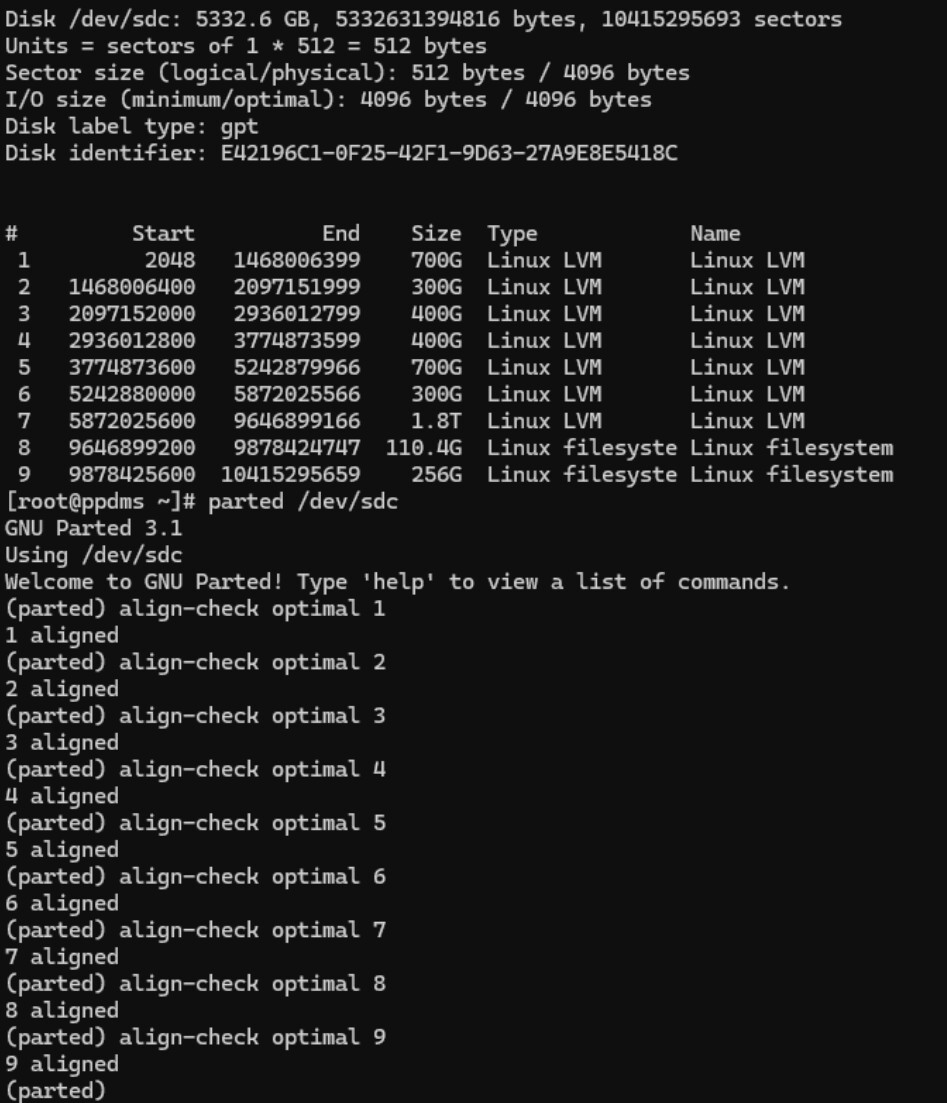
sorry i’m not very familiar with blocksizes on HD Drives. On which machine ist this relevant (Backupserver or VM). On both the partitions begins at 2048 an parted show them as aligned. Or should i change the logical Sector size (hdparm --set-sector-size 4096 /dev/sdX)?
Please excuse my question, but I don’t understand what I have to do.
The VHDX Size is 5048537972736 (see the screenshot) and that ist divisible by 4096 (5048537972736/4096=1232553216). To what size should I enlarge the VHDX file?