Backup on Windows Server 2022 won’t start

Since UrBackup can’t copy all files from my disk at once (the speed is extremely low — estimated backup time is more than 7 days), I decided to split the backup into several parts using multiple virtual clients.

One client with a simple configuration

works fine and successfully starts copying.
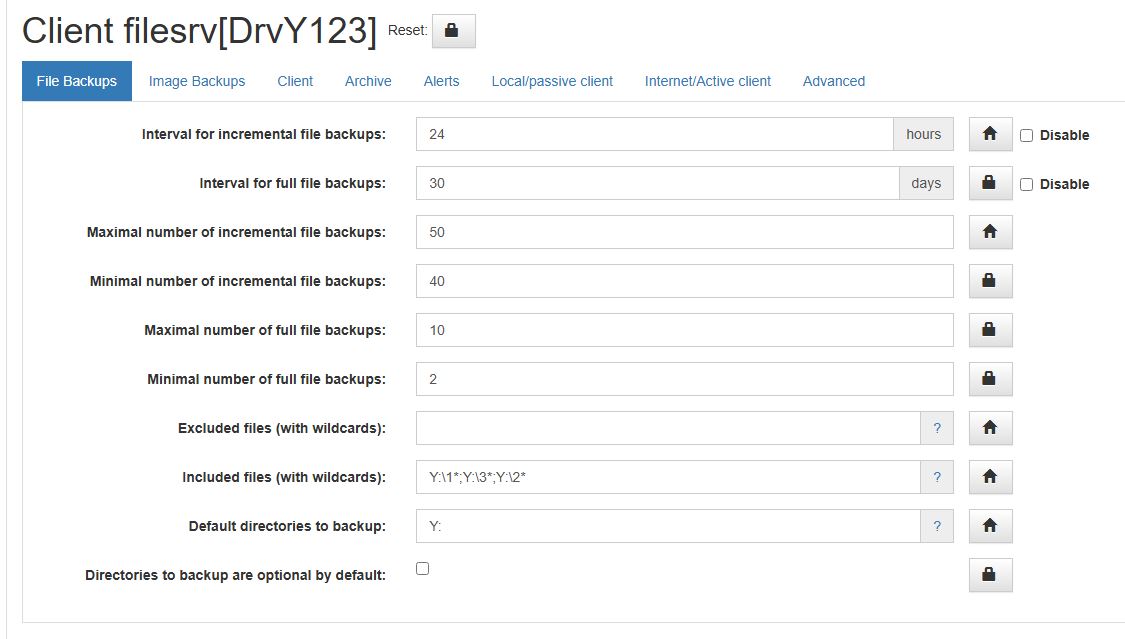
However, clients with more complex configurations
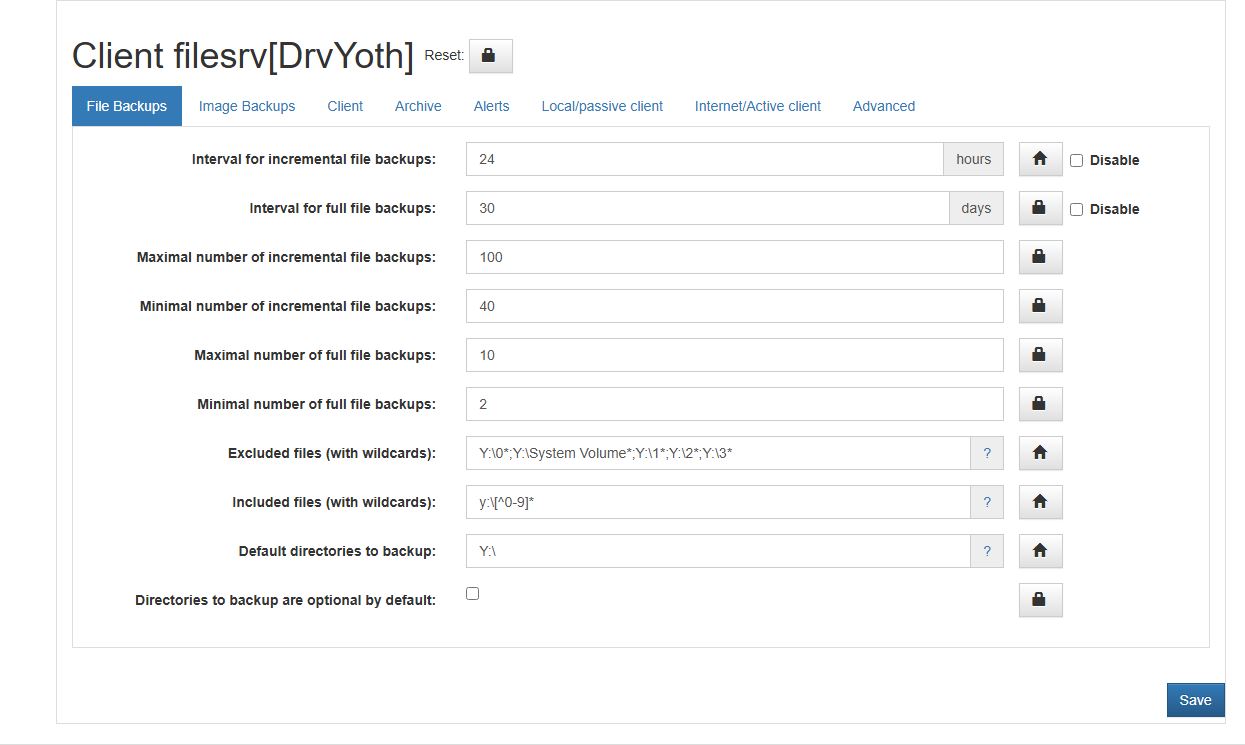
do not start the backup process.

When the backup starts, the client first spends a long time (about 30 minutes) reading the file
C:\Program Files\UrBackup\urbackup\backup_client.db
and writing to
C:\Program Files\UrBackup\urbackup\backup_client.db-wal.

Currently, backup_client.db is about 120 MB, and backup_client.db-wal is about 180 MB.
After that, the client seems to hang (I waited up to 20 hours before stopping the service).
During this time, there is a constant CPU load of about 17%, but according to monitoring, there is no disk or network activity, no new debug log entries, and no attempt to create a shadow copy (VSS).

At the same time, the server log shows the following messages:

2025-10-30 13:51:27: Error sending ‘running’ (2) ping to client
2025-10-30 13:51:27: Timeout: Error sending ‘running’ (2) ping to client
2025-10-30 13:51:27: Error sending ‘running’ (3) ping to client
2025-10-30 13:51:47: Error sending ‘running’ (2) ping to client
2025-10-30 13:51:47: Timeout: Error sending ‘running’ (2) ping to client
2025-10-30 13:51:47: Error sending ‘running’ (3) ping to client
2025-10-30 13:52:07: Error sending ‘running’ (2) ping to client
2025-10-30 13:52:07: Timeout: Error sending ‘running’ (2) ping to client
2025-10-30 13:52:07: Error sending ‘running’ (3) ping to client

However, according to the web interface , the server still sees the client as “online”.

What could be the problem and how can I fix it?

Server version 2.5.33

Clien version 2.5.26

Installed client version 2.5.25
It worked fine for me on other servers, but the problem remained.
After I removed the entry y:\[^0-9]* from the Included files (with wildcards): section, the backup started.
However, the problem with low copy speed still remains, and during the copy process the service crashed.

2025-11-01 20:51:19: WARNING: FileSrv: Error: File end and not all Buffers are free!-1
2025-11-01 20:55:19: WARNING: FileSrv: Error: File end and not all Buffers are free!-1
2025-11-01 21:01:20: ERROR: Error creating thread. Errno: 1455
2025-11-01 21:01:20: WARNING: Retrying creating thread for thread pool in 2s...
2025-11-01 21:03:22: ERROR: Error creating thread. Errno: 1450
2025-11-01 21:03:22: WARNING: Retrying creating thread for thread pool in 2s...
2025-11-01 21:03:24: ERROR: Error creating thread. Errno: 1455
2025-11-01 21:03:24: WARNING: Retrying creating thread for thread pool in 4s...
2025-11-01 21:05:29: ERROR: FileSrv: Error occurred while reading from file "\\?\GLOBALROOT\Device\HarddiskVolumeShadowCopy686\\02\01\!!All\\Зал общий\2014\IMG_20141020_103808_HDR.jpg" (code: 1450) -2.
2025-11-01 21:05:29: WARNING: FileSrv: Error: File end and not all Buffers are free!-1
2025-11-01 21:11:30: ERROR: Error creating thread. Errno: 1455
2025-11-01 21:11:30: WARNING: Retrying creating thread for thread pool in 2s...
2025-11-01 21:11:33: ERROR: Error creating thread. Errno: 1455
2025-11-01 21:11:33: WARNING: Retrying creating thread for thread pool in 4s...
2025-11-01 21:11:37: ERROR: Fatal exception code 3221225725 at address 0x00007FFDD8871532
2025-11-01 21:11:37: ERROR: Writing minidump failed: Last error=-2147024888
2025-11-01 21:11:37: ERROR: Fatal exception (APPLICATION CRASHED). Crash dump written to "C:\Windows\TEMP\UrBackup\v2.0.0-20251101-211137-10012-5072.dmp"
2025-11-01 21:11:37: ERROR: Program abort (SIGABRT)

The dump file is empty, 0 bytes in size.
After restarting, the backup seemed to finish, but on the server side the copy process did not close and is stuck in this state:

Server log entry:

03.11.25 04:57 INFO Removing snapshot on “filesrv[DrvY00]” for path “Y_2/clientsubname=DrvY00” failed: TIMEOUT
03.11.25 04:57 INFO Waiting for file hashing and copying threads…

At the same time, the UrBackupClientBackend process itself occupies 1 GB of RAM.
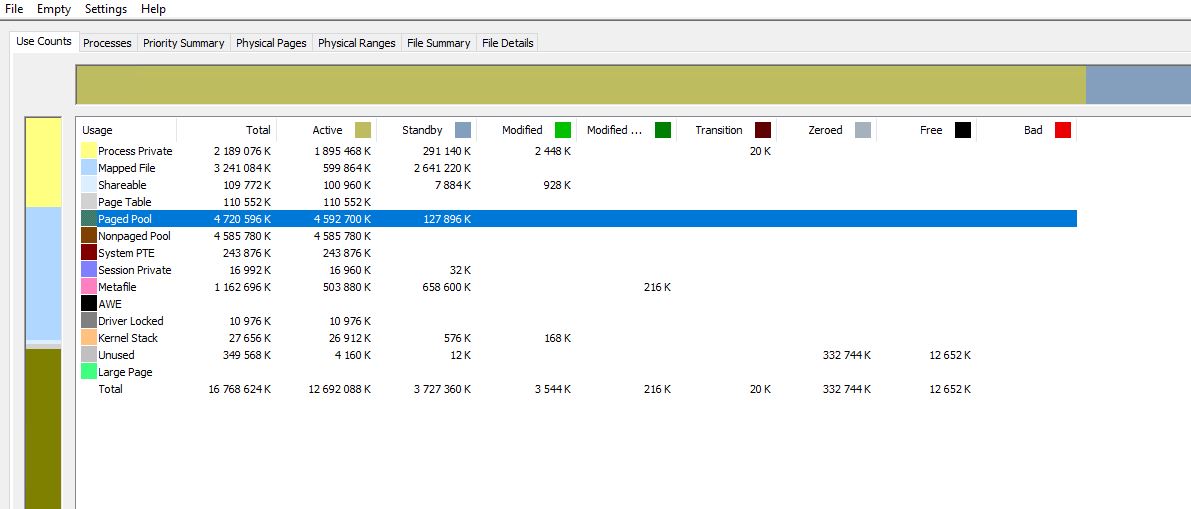
Also, the memory distribution on the server looks very strange.

I have a feeling that there is a memory leak somewhere or a compatibility issue with some drivers.
The server is virtual and runs under XCP-NG (Xen).
Aside from UrBackup, only the Xen drivers and a couple of Microsoft utilities are installed on the server.

Maybe someone has encountered this issue before — please help me solve the problem.